Fly Friendly

Know when your flight changes. Share it only with the friends you choose.

Fly Friendly is a flight tracker app for iPhone and Android that alerts you to delays, gate changes and cancellations and lets you share each flight with only the friends you choose.

It also keeps a logbook of every flight you take, and each flight stays private until you decide who sees it.

  • Coming soon to theApp Store
  • Coming soon toGoogle Play

Free to use, with one banner ad. Pro is optional. Questions? support@flyfriendly.site

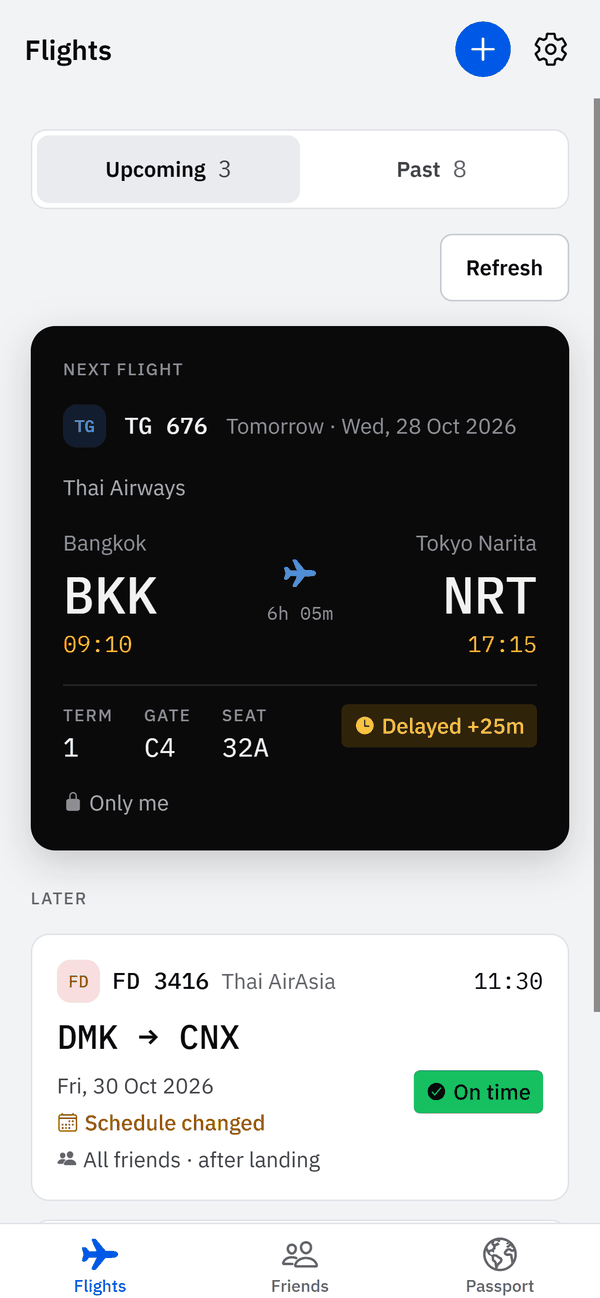
Fly Friendly Flights screen: the next flight, TG 676 from Bangkok to Tokyo Narita, with departure and arrival times, terminal 1, gate C4, seat 32A and a 25-minute delay

What Fly Friendly does

Add a flight by its number and date and Fly Friendly follows it. Or type the flight in yourself to keep it in your logbook; flights entered by hand have no live status.

Screens from the app, filled with made-up sample flights. Map data © OpenMapTiles © OpenStreetMap contributors.

Hear about it when your flight changes

You do not have to keep refreshing. Fly Friendly sends an alert for a delay of 15 minutes or more, a new gate or terminal, a cancellation or a diversion. Pro adds boarding, takeoff, landing and baggage-belt alerts, where the airport shares belt data.

Notifications screen: switches for delay, gate change, boarding, takeoff, landing and baggage-belt alerts; the last four are marked Pro

Private until you share

New flights are visible only to you. For each flight, choose Only me, All friends or Selected friends. With “Only me until I land”, friends see the trip after you have landed.

The “Who can see this flight?” sheet with Only me, All friends and Selected friends, and the “Only me until I land” switch turned on

Follow a friend's flight

Waiting at the airport for someone? When a friend shares a flight with you, open it in Friends and tap Notify me. You get an alert when they land. Add friends with your invite link, and if you are on the same flight, invite each other. You both need the app.

Friends screen: an invite to fly together, a friend request with Accept and Decline, and friends’ next flights

Passport and country stamps

Your routes on one map, with kilometers, airports, airlines, countries and time in the air, and a stamp for every country, each with a landmark drawing.

Passport screen: a map of routes flown from Bangkok, with totals for flights, kilometers, time in the air, airports, airlines and countries
Stamps screen: stamps for Thailand, Japan, Hong Kong, Singapore and Taiwan, each with a landmark drawing
  • A logbook of every flight

    Search and tag your flights and export them as CSV. Import past flights from other flight apps or a CSV file; the last 2 years are free.

  • On your home screen, even without signal

    A home screen widget shows your next flight. Your flights are saved on your phone, so they open without signal.

Your travel map

Route map from the Passport screen: lines from Bangkok to Tokyo, Taipei, Hong Kong, Singapore and other airports
The Passport route map, with sample flights. Map data © OpenMapTiles © OpenStreetMap contributors.

How it works

  1. Sign in and add a flight

    Enter the flight number and date, or type the flight in yourself.

  2. Allow notifications

    Fly Friendly alerts you when a flight you added by number changes.

  3. Share only if you want to

    Pick who sees each flight: only you, all your friends or selected friends. Until you pick, nobody else sees it.

The alerts you get

The free plan covers the changes that make you rush or wait. Pro adds an alert for each step of the trip.

Flight data comes from a third-party provider. It can arrive late or differ from what the airport shows, so always check the airport screens before you travel.

Alerts
EventPlan
Delay 15 minutes or moreFree
Gate or terminal changeFree
CancellationFree
DiversionFree
A friend landed after you tap Notify meFree
Boarding, takeoff, landingPro
Baggage belt where the airport shares itPro

Free and Pro

Everything above works on the free plan. Pro adds more alerts, calendar sync and older imports, and removes the ads.

Free

With one banner ad from Google AdMob

  • Status, gate, terminal and delay for flights you add by number
  • Alerts for delays, gate and terminal changes, cancellations and diversions
  • Friends and flight-by-flight sharing
  • Logbook, Passport and country stamps
  • Home screen widget for your next flight
  • Import the last 2 years of flights
  • English, Thai and Simplified Chinese, light and dark themes

Pro

Everything in Free, plus

  • Every alert: boarding, takeoff, landing and baggage belt
  • Calendar sync
  • Import flights older than 2 years
  • No ads

Pro is a monthly or yearly subscription. It renews automatically until you cancel. You can also buy a 7-day Trip Pass: one payment, no renewal. Prices are shown in the store and in the app, in your local currency. The App Store or Google Play does the billing. To avoid the next charge, cancel at least 24 hours before the period ends. How to cancel

Your data and privacy

Fly Friendly is built so that you decide who sees each trip. In short:

  • Private by default

    Friends see a flight only if you share it with them.

  • Some details are only ever yours

    Notes, booking references, tags and cabin class are never shown to anyone else. Your seat is shown only if you turn on seat sharing for that flight.

  • Your GPS position stays on your phone

    If you use your phone's GPS on a flight map, the app reads it only while that screen is open. It is not stored, logged or sent to us.

  • Flight lookups carry no identity

    We send the flight-data provider the flight number and date, never your name, email or account.

  • Ads only on the free plan

    The free plan shows one banner ad from Google AdMob. AdMob collects data, including an approximate location estimated from your IP address, as the Privacy Policy explains. On iPhone, iOS asks whether you allow tracking before the first ad. Pro has no ads and does not start the ad software.

  • Export or delete at any time

    Export your flights as CSV, or delete your account inside the app. We do not sell your personal data. This website has no scripts, and we add no cookies or trackers to it.

What other users can see
DataWho can see it
A flightNobody unless you share it: with all friends, selected friends, or (after an accepted “fly together” invite) the people on that flight with you. You can choose to share only after landing.
SeatOnly people who can see the flight, and only if you turned on seat sharing for it.
Cabin, tags, notes, booking referenceOnly you.
Profile pictureYou and your accepted friends only (not shown in search).
Username and display nameYour friends; people you exchange friend or flight invites with; anyone signed in who types your exact username or opens your invite link. People you block cannot find you.

iPhone, Android and three languages

Fly Friendly runs on iPhone and Android, in English, Thai and Simplified Chinese, with light and dark themes. Choose the language in the app. This website has the same three. A home screen widget shows your next flight on both systems.

To see a flight you share, your friend needs the app and an account.

You can write to support in English or Thai.

Bring your flight history

Import past flights from other flight apps or from a CSV file. The last 2 years are free; older flights need Pro. The file is read on your phone, and any names, emails or account details in it are skipped. Your logbook exports as CSV whenever you want it.

What is Fly Friendly?

Fly Friendly is a flight tracker app for iPhone and Android. Add a flight by number and date and it alerts you to delays of 15 minutes or more, gate and terminal changes, cancellations and diversions. It also keeps a logbook of your trips. Every flight stays private until you choose which friends can see it.

Is Fly Friendly free, and what does Pro cost?

Fly Friendly is free to download and use, with one banner ad. Pro is an optional monthly or yearly subscription that adds every alert, calendar sync and imports older than two years, and removes the ads. A 7-day Trip Pass is a one-off alternative that does not renew. The App Store and Google Play show current prices in your currency.

Does Fly Friendly work on both iPhone and Android?

Yes. Fly Friendly runs on iPhone and Android. Anyone who wants to see a shared flight needs the app and an account.

Who can see my flights?

Nobody but you, until you share. New flights are private. For each flight you choose Only me, All friends or Selected friends, and “Only me until I land” shows the trip to friends only after you have landed. Notes and booking references are never shared with anyone.

Does Fly Friendly track my location?

Fly Friendly reads your phone's GPS only if you choose to use it on a flight map, and only while that screen is open. The position is not stored, logged or sent to us. The free plan shows ads from Google AdMob, which can estimate your approximate location from your IP address. Pro shows no ads.

Where does Fly Friendly get its flight data, and how accurate is it?

Flight status, gates and delays come from a third-party flight-data provider. We send it the flight number and date, never your name, email or account. The data can differ from airport screens, so check the airport displays before you travel. Flights you enter by hand have no live status.

Which flight alerts does Fly Friendly send?

Free accounts get alerts for delays of 15 minutes or more, gate and terminal changes, cancellations and diversions. Pro adds boarding, takeoff, landing and baggage-belt alerts, where the airport shares belt data. In Notifications you can switch the delay, gate, boarding, takeoff, landing and baggage alerts on or off. Cancellations and diversions are always sent.

Can I follow a friend's flight and get an alert when they land?

Yes, if your friend shares the flight with you. Open it in Friends and tap Notify me, and you get an alert when they land. You can also invite friends who are on the same flight. You both need Fly Friendly, and sharing starts only after both of you accept.

Does Fly Friendly support Thai and Chinese?

Yes. The app is available in English, Thai and Simplified Chinese, with light and dark themes, and this website has the same three languages. You set the language in the app. You can write to support in English or Thai.

I used another flight app. Can I move my flights to Fly Friendly?

Yes. You can import past flights from other flight apps or from a CSV file. The last two years of flights import free; older flights need Pro. The file is read on your phone, and names, emails and account details in it are skipped.

How do I cancel Fly Friendly Pro?

Pro is billed by Apple or Google, not by Fly Friendly, so cancel in the store. On iPhone: Settings, your name, Subscriptions, Fly Friendly. On Android: Google Play, profile picture, Payments and subscriptions, Subscriptions. Cancel at least 24 hours before renewal. Deleting the app does not cancel it.

How do I delete my Fly Friendly account and data?

In the app: tap the gear icon, then Profile and settings, Account, Delete account, and type the confirmation word shown (DELETE in English). Your account and data are deleted straight away. Without the app, email support@flyfriendly.site from your sign-in address and we delete the account within 7 days of your confirmation. Cancel any Pro subscription in the store first, because deleting the account does not cancel it. What is kept is listed on the Delete your account page.

Do I need an account?

Yes. Friends, sharing, alerts and syncing belong to an account, so you sign in with your email address before you use the app.

Who makes Fly Friendly

Fly Friendly is made by Varintha Chetanasena (operating as Fly Friendly), an independent developer in Thailand. Questions, problems, or someone to report? Write to us in English or Thai.

Answers about purchases, notifications, invite links and blocking are on the Support page.